The term Cloud refers to a Network or Internet. In other words, we can say that Cloud is something, which is present at remote location. Cloud can provide services over public and private networks, i.e., WAN, LAN or VPN.
Applications such as e-mail, web conferencing, customer relationship management (CRM) execute on cloud.
Cloud Computing refers to manipulating, configuring, and accessing the hardware and software resources remotely. It offers online data storage, infrastructure, and application.
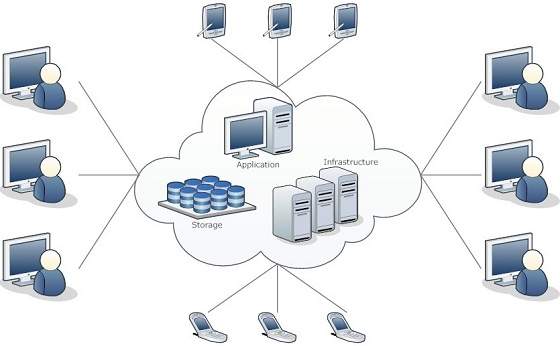 Cloud computing offers platform independency, as the software is not required to be installed locally on the PC. Hence, the Cloud Computing is making our business applications mobile and collaborative.
Basic Concepts
There are certain services and models working behind the scene making the cloud computing feasible and accessible to end users. Following are the working models for cloud computing:
- Deployment Models
- Service Models
Deployment Models
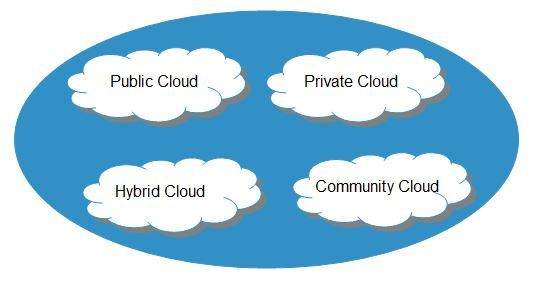
Deployment models define the type of access to the cloud, i.e., how the cloud is located? Cloud can have any of the four types of access: Public, Private, Hybrid, and Community.
PUBLIC CLOUD
The public cloud allows systems and services to be easily accessible to the general public. Public cloud may be less secure because of its openness.
PRIVATE CLOUD
The private cloud allows systems and services to be accessible within an organization. It is more secured because of its private nature.
COMMUNITY CLOUD
The community cloud allows systems and services to be accessible by a group of organizations.
HYBRID CLOUD
The hybrid cloud is a mixture of public and private cloud, in which the critical activities are performed using private cloud while the non-critical activities are performed using public cloud.
Service Models
Cloud computing is based on service models. These are categorized into three basic service models which are -
- Infrastructure-as–a-Service (IaaS)
- Platform-as-a-Service (PaaS)
- Software-as-a-Service (SaaS)
Anything-as-a-Service (XaaS) is yet another service model, which includes Network-as-a-Service, Business-as-a-Service, Identity-as-a-Service, Database-as-a-Service or Strategy-as-a-Service.
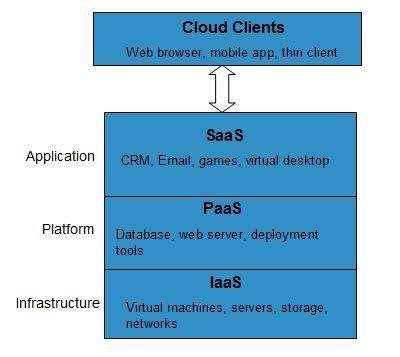
The Infrastructure-as-a-Service (IaaS) is the most basic level of service. Each of the service models inherit the security and management mechanism from the underlying model, as shown in the following diagram:
INFRASTRUCTURE-AS-A-SERVICE (IAAS)
IaaS provides access to fundamental resources such as physical machines, virtual machines, virtual storage, etc.
PLATFORM-AS-A-SERVICE (PAAS)
PaaS provides the runtime environment for applications, development and deployment tools, etc.
SOFTWARE-AS-A-SERVICE (SAAS)
SaaS model allows to use software applications as a service to end-users.
History of Cloud Computing
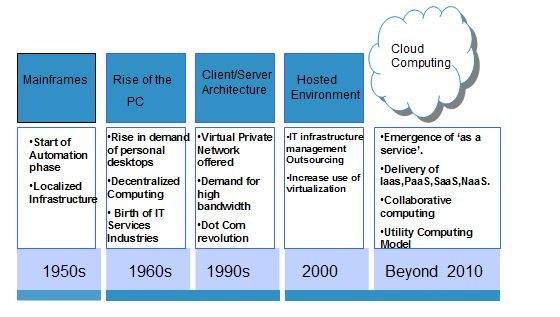
The concept of Cloud Computing came into existence in the year 1950 with implementation of mainframe computers, accessible via thin/static clients.Since then, cloud computing has been evolved from static clients to dynamic ones and from software to services. The following diagram explains the evolution of cloud computing:
Benefits
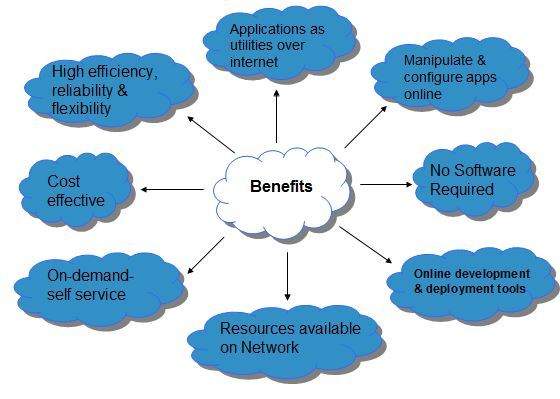
Cloud Computing has numerous advantages. Some of them are listed below -
-
One can access applications as utilities, over the Internet.
-
One can manipulate and configure the applications online at any time.
-
It does not require to install a software to access or manipulate cloud application.
-
Cloud Computing offers online development and deployment tools, programming runtime environment through PaaS model.
-
Cloud resources are available over the network in a manner that provide platform independent access to any type of clients.
-
Cloud Computing offers on-demand self-service. The resources can be used without interaction with cloud service provider.
-
Cloud Computing is highly cost effective because it operates at high efficiency with optimum utilization. It just requires an Internet connection
-
Cloud Computing offers load balancing that makes it more reliable.
One can access applications as utilities, over the Internet.
One can manipulate and configure the applications online at any time.
It does not require to install a software to access or manipulate cloud application.
Cloud Computing offers online development and deployment tools, programming runtime environment through PaaS model.
Cloud resources are available over the network in a manner that provide platform independent access to any type of clients.
Cloud Computing offers on-demand self-service. The resources can be used without interaction with cloud service provider.
Cloud Computing is highly cost effective because it operates at high efficiency with optimum utilization. It just requires an Internet connection
Cloud Computing offers load balancing that makes it more reliable.
Risks related to Cloud Computing
Although cloud Computing is a promising innovation with various benefits in the world of computing, it comes with risks. Some of them are discussed below:
Security and Privacy
It is the biggest concern about cloud computing. Since data management and infrastructure management in cloud is provided by third-party, it is always a risk to handover the sensitive information to cloud service providers.
Although the cloud computing vendors ensure highly secured password protected accounts, any sign of security breach may result in loss of customers and businesses.
Lock In
It is very difficult for the customers to switch from one Cloud Service Provider (CSP) to another. It results in dependency on a particular CSP for service.
Isolation Failure
This risk involves the failure of isolation mechanism that separates storage, memory, and routing between the different tenants.
Management Interface Compromise
In case of public cloud provider, the customer management interfaces are accessible through the Internet.
Insecure or Incomplete Data Deletion
It is possible that the data requested for deletion may not get deleted. It happens because either of the following reasons
-
Extra copies of data are stored but are not available at the time of deletion
-
Disk that stores data of multiple tenants is destroyed.
Extra copies of data are stored but are not available at the time of deletion
Disk that stores data of multiple tenants is destroyed.
Characteristics of Cloud Computing
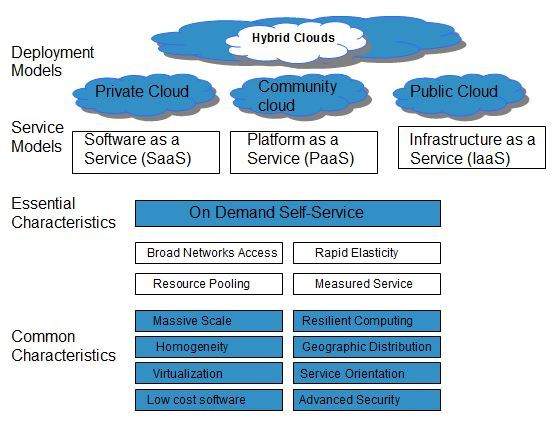
There are four key characteristics of cloud computing. They are shown in the following diagram:
Comments